Introduction
Datapipe is a Python framework for durable, incremental batch processing.
You define a pipeline as a graph of tables connected by transform functions. Datapipe tracks dependencies at the record level: when a row in an input table changes, only the downstream computations that depend on that specific row are re-run. Everything else is skipped. Processing state is persisted to a metadata store, so a pipeline interrupted mid-run picks up where it left off on the next execution.
What problems does it solve?
Most data processing tasks involve running the same logic repeatedly as source data grows or changes. Without incremental tracking, you have two unappealing options: reprocess everything on every run (expensive) or write custom change-detection logic yourself (fragile and tedious).
Datapipe handles the change-detection bookkeeping so your transform functions stay simple and stateless — they receive a pd.DataFrame of rows to process and return a pd.DataFrame of results. Datapipe takes care of figuring out which rows those should be.
What it is good for
- File and media processing — resize images, transcode video, extract text; only re-process files that have changed.
- ML inference pipelines — run a model over a dataset; automatically re-infer when the model or the input data changes.
- Data enrichment — join, filter, and reshape records across multiple source tables; propagate changes incrementally through the graph.
- External data synchronisation — pull from APIs or databases periodically; only downstream steps that are affected by new or updated records are re-triggered.
What it is not
Datapipe is not a streaming engine. It processes data in batches (pandas DataFrames) and is designed for workloads where latency of seconds to minutes is acceptable. It is also not a distributed compute engine — for large-scale parallelism, it integrates with Ray via RayExecutor.
Prerequisites
- Python 3.10+
- SQLAlchemy 2.0 (used for defining table schemas and the metadata store)
Installation
Requirements
- Python 3.10 or later
- A SQL database for the metadata store (SQLite for local development, PostgreSQL for production)
Install
The package is published as datapipe-core on PyPI:
pip install datapipe-core
For local development with SQLite, add the sqlite extra. Python ships with an older SQLite version that datapipe cannot use — the extra installs a compatible binary:
pip install "datapipe-core[sqlite]"
Optional extras
| Extra | Installs |
|---|---|
sqlite | pysqlite3-binary — required for SQLite support |
redis | redis client |
elastic | elasticsearch client |
qdrant | qdrant-client |
milvus | pymilvus |
ray | ray[default] — for parallel execution across steps |
gcsfs | gcsfs — for Google Cloud Storage file backends |
s3fs | s3fs — for S3 file backends |
excel | xlrd, openpyxl — for Excel file backends |
gcp | OpenTelemetry GCP trace exporter |
pyarrow | Parquet file backend support |
neo4j | Neo4j graph store backend |
Multiple extras can be combined:
pip install "datapipe-core[sqlite,redis]"
Verify
datapipe --help
This should print the datapipe CLI help. If the command is not found, check that the Python environment where you installed the package is active.
Your First Pipeline
This guide walks through building a minimal pipeline that demonstrates datapipe's core behaviour: running only the work that needs to be done.
What we'll build
A pipeline with two steps:
- Generate a small table of words.
- Transform each word into its character count.
When a word changes, only its downstream computation re-runs. Everything unchanged is skipped.
Prerequisites
Install datapipe with the SQLite extra for local development:
pip install "datapipe-core[sqlite]"
The pipeline
Create a file app.py:
import pandas as pd
from sqlalchemy.orm import DeclarativeBase, Mapped, mapped_column

from datapipe.compute import Catalog, DatapipeApp, Pipeline
from datapipe.datatable import DataStore
from datapipe.step.batch_generate import BatchGenerate
from datapipe.step.batch_transform import BatchTransform
from datapipe.store.database import DBConn


class Base(DeclarativeBase):
    pass


class Word(Base):
    __tablename__ = "words"

    word_id: Mapped[int] = mapped_column(primary_key=True)
    text: Mapped[str]


class WordLength(Base):
    __tablename__ = "word_lengths"

    word_id: Mapped[int] = mapped_column(primary_key=True)
    length: Mapped[int]


def generate_words():
    yield pd.DataFrame([
        {"word_id": 1, "text": "hello"},
        {"word_id": 2, "text": "world"},
        {"word_id": 3, "text": "datapipe"},
    ])


def compute_lengths(df: pd.DataFrame) -> pd.DataFrame:
    return df.assign(length=df["text"].str.len())[["word_id", "length"]]


pipeline = Pipeline([
    BatchGenerate(generate_words, outputs=[Word]),
    BatchTransform(
        compute_lengths,
        inputs=[Word],
        outputs=[WordLength],
    ),
])

dbconn = DBConn("sqlite+pysqlite3:///first_pipeline.sqlite", sqla_metadata=Base.metadata)
ds = DataStore(dbconn)
app = DatapipeApp(ds, Catalog({}), pipeline)
Run it
Create the database tables (do this once):
datapipe db create-all
Run the pipeline:
datapipe run
You should see both steps execute: generate_words fills the words table, then compute_lengths produces a row in word_lengths for each word.
Run again:
datapipe run
This time nothing is reprocessed — datapipe sees that the source data hasn't changed and skips both steps. This is the core behaviour: work is only done when it needs to be.
See the step list
datapipe step list
This shows all steps in your pipeline and how many records are pending for each.
What just happened
BatchGenerateis a special step that populates a table from an external source (here, a Python generator). It runs in full each time and datapipe detects which rows changed.BatchTransformreceives apd.DataFrameof the rows that need processing and returns apd.DataFrameof results. Datapipe tracks theupdate_ts/process_tspair for every record to determine what to pass in.- The metadata (which rows were processed, when, with what result) is stored in the SQLite file alongside your data tables.
Next steps
- Read Concepts to understand how incremental tracking works.
- See How to pull data from external sources for more
BatchGeneratepatterns. - See How to run model inference for multi-input transforms.
What is Datapipe?
Datapipe is a Python framework for durable, incremental batch processing. It lets you define a data processing graph once, then run it repeatedly as data changes — processing only what needs to be processed.
The core idea
A Datapipe pipeline is a directed graph of Tables connected by Steps. Each step is a Python function that receives one or more pd.DataFrames as input and produces one or more pd.DataFrames as output.
What makes this different from a plain script is what Datapipe tracks between runs:
- For each record in every table, it knows the last time that record was updated (
update_ts). - For each step, it knows the last time each record was processed (
process_ts). - Before running a step, Datapipe computes the set of records where
update_ts > process_tsacross all inputs. Only those records are passed to your function.
This means your transform functions are always simple and stateless. They do not need to know which records are "new" — Datapipe handles that entirely.
Durability
Processing state is written to a SQL metadata store after each successful batch. If a pipeline is interrupted — by a crash, a deployment, or a manual stop — the next run resumes from where it left off. No records are skipped or double-processed.
This makes Datapipe suitable for long-running jobs over large datasets where reliability matters.
Batch orientation
The unit of work in Datapipe is a pd.DataFrame batch, not a single row and not a stream event. The chunk_size parameter on BatchTransform controls how many rows are included per batch. This allows you to tune memory usage and throughput independently.
What Datapipe is not
- Not a streaming engine. There is no concept of low-latency event processing or windowing. Runs are triggered explicitly.
- Not a distributed compute engine. By default, steps run single-threaded. A
RayExecutoris available for parallelism across steps. - Not opinionated about storage. Tables can live in a SQL database, on the filesystem, in Redis, Elasticsearch, Qdrant, Milvus, or a custom backend — as long as you provide a
TableStoreimplementation.
Tables and TableStores
Work in progress. This page has not been written yet.
Pipeline Steps
Needs review. This page was carried over from the previous documentation and has not been updated yet.
Patterns of data flow
Generating data from an external source
Examples:
- Parsing a product feed (e.g. YML) and populating a table
- Calling an external API to retrieve a list of items
Generation runs in batches; the total volume is not known in advance.
Batch transformation 1-to-1 (no dependency on all data)
Examples:
- Resizing images
- Running ML model inference
Batch transformation 1-to-N or N-to-1 on small batches
Examples:
- Expanding product attributes into individual records:
(product_id)→(product_id, attribute_id) - Aggregating classified bounding boxes into one record per image:
(image_id, bbox_id)→(image_id)
Global (or near-global) transformation
Data may be read multiple times. The total volume may be too large to fit in memory at once.
Example: training an ML model on a full table.
ComputeStep types
DatatableTransform
Accepts a list of input and output DataTables and applies an external function to them.
This type gives Datapipe no visibility into which individual records changed, so it cannot perform incremental (Changelist) processing. Use it for generation steps and global transforms such as model training.
BatchTransform
Accepts a function func together with input and output tables. Datapipe uses record-level metadata to determine which rows need reprocessing and passes only those rows to func in chunks.
Suitable for incremental (Changelist) processing.
Covers 1-to-1 batch transforms and small-batch 1-to-N / N-to-1 patterns.
Magic injection — Datapipe inspects the signature of func and automatically supplies:
ds→ the activeDataStorerun_config→ the currentRunConfigidx→ anIndexDFcontaining the primary keys of the current batch
BatchGenerate
Accepts a generator function func and output tables outputs. Use this step when you need to define primary (source) tables or periodically synchronise data from an external source (another database table, files on disk, etc.).
Magic injection:
ds→ the activeDataStore
Incremental Processing
Work in progress. This page has not been written yet.
Primary Keys and Transform Keys
Work in progress. This page has not been written yet.
How to Transform Files (1-to-1)
Work in progress. This page has not been written yet.
How to Pull Data from External Sources
Work in progress. This page has not been written yet.
How to Run Model Inference (Multi-Input Transforms)
Work in progress. This page has not been written yet.
How to Expand One Row Into Many (1-to-N)
Work in progress. This page has not been written yet.
How to Map Mismatched Primary Keys
Work in progress. This page has not been written yet.
How to Filter Steps by Labels
Work in progress. This page has not been written yet.
Using with SQLite
Needs review. This page was carried over from the previous documentation and has not been updated yet.
Python comes with some (at least 3.7.15) version of SQLite included.
Unfortunately for datapipe we need at least 3.39.0 version due to usage of
FULL OUTER JOIN in some queries. That's why we can't rely on Python embedded
sqlite module.
Installation
We configured sqlite extra in datapipe-core package, which installs
pysqlite3-binary and sqlalchemy-pysqlite3. With versions selected we can
guarantee that installed sqlite3 version is sufficient.
So specifying datapipe-core dependency with sqlite extra will provide
correct dependencies.
# pyproject.toml
datapipe-core = {version="^0.11.11", extras=["sqlite"]}
Gotchas
Alongside with pysqlite3-binary there's a package pysqlite3. In our
experience pysqlite3 package sometimes comes with old version of sqlite3,
please be aware.
Usage
In order to use sqlite3 as a storage for metadata you should specify dbconn with
"sqlite+pysqlite3://" driver:
dbconn = DBConn("sqlite+pysqlite3:///db.sqlite")
How to Manage Schema Changes with Alembic
Work in progress. This page has not been written yet.
Extending datapipe cli
Needs review. This page was carried over from the previous documentation and has not been updated yet.
Entry point
Datapipe offers a way to add additional cli commands. It is achieved by utilizing Python entrypoints mechanism.
Datapipe looks for entrypoints with group name datapipe.cli and expects a
function with signature:
import click

def register_commands(cli: click.Group) -> None:
    ...
Context
Plugin can expect some information in click.Context:
-
ctx.obj["pipeline"]:datapipe.compute.DatapipeAppinstance of DatapipeApp with all necessary initialization steps performed -
ctx.obj["executor"]:datapipe.executor.Executorcontains an instance of Executor which will be used to perform computation
Example
To see example of extending datapipe cli see datapipe_app.cli:
https://github.com/epoch8/datapipe-app/blob/master/datapipe_app/cli.py
Run Callbacks
datapipe run and datapipe step run attach a
RunCallback to every run for lifecycle
events and step progress. In addition to the built-in progress printer, other
packages can plug in their own callback (e.g. recording runs to an Ops
dashboard) via the datapipe.run_callbacks entry-point group:
from datapipe.compute import ComputeStep, DatapipeApp
from datapipe.run_callback import RunCallback
from datapipe.types import Labels

def make_run_callback(
    app: DatapipeApp,
    steps: list[ComputeStep],
    *,
    labels: Labels,
    pipeline_spec: str | None,
) -> RunCallback | None:
    ...
Register it the same way as a datapipe.cli entry point, under the
datapipe.run_callbacks group instead:
[project.entry-points."datapipe.run_callbacks"]
my_callback = "my_package.callbacks:make_run_callback"
Return None from the factory to opt the run out without registering a
callback. Every entry point in this group is loaded and combined via
CompositeRunCallback, so a failure in one callback is logged rather than
aborting the run or the other callbacks. Pass --no-callbacks to datapipe run / datapipe step run to skip loading entry-point callbacks for a single
invocation (the built-in progress printer is unaffected — see
CLI Commands).
How to Report Progress from a Pipeline Run
run_steps reports lifecycle events and step progress through a single
RunCallback attached to RunConfig.callback. See
Run Callbacks for the full API reference.
Use the built-in progress printer
If you call run_steps directly (outside of the datapipe CLI, which
already attaches one for you), attach StdoutRunCallback to get throttled
step: completed/total lines with average time per item and ETA:
from datapipe.compute import run_steps
from datapipe.run_config import RunConfig
from datapipe.run_callback_stdout import StdoutRunCallback

run_steps(
    ds,
    steps,
    run_config=RunConfig(callback=StdoutRunCallback()),
)
Write a custom callback
Subclass RunCallback and override only the events you care about — the
rest stay no-ops. For example, forwarding progress to your own metrics
system:
from datapipe.run_callback import RunCallback

class MetricsRunCallback(RunCallback):
    def on_step_progress(self, step, completed, total):
        my_metrics.gauge("datapipe.step.progress", completed, tags={"step": step.name})


run_steps(ds, steps, run_config=RunConfig(callback=MetricsRunCallback()))
A callback that raises inside run_steps will propagate and abort the run —
RunConfig.callback itself does not catch exceptions. Use
CompositeRunCallback (next section) if you want failures in one callback
isolated from the others and from the pipeline.
Combine multiple callbacks
from datapipe.run_callback import CompositeRunCallback
from datapipe.run_callback_stdout import StdoutRunCallback

run_config = RunConfig(
    callback=CompositeRunCallback([StdoutRunCallback(), MetricsRunCallback()]),
)
run_steps(ds, steps, run_config=run_config)
CompositeRunCallback calls each sub-callback's method inside its own
try/except, logging and continuing on failure — this is the fail-open
behavior described in the reference page.
Attach a callback to the datapipe CLI
To have your callback attached automatically by datapipe run / datapipe step run (e.g. for an Ops dashboard, without changing pipeline code),
register a datapipe.run_callbacks entry point — see
Extend the CLI for the factory signature.
Users can skip all entry-point callbacks for a single invocation with
datapipe run --no-callbacks (the built-in StdoutRunCallback still runs;
--no-callbacks only controls entry-point-loaded callbacks).
Developing TableStore
Needs review. This page was carried over from the previous documentation and has not been updated yet.
When you need it?
If you need Datapipe to read or write data to a specific database which is not supported out of the box, you will have to write custom TableStore implementation.
TableStore functionality overview
TBD
Testing
For testing standard TableStore implementation functionality there's a base set
of tests, implemented in datapipe.store.tests.abstract.AbstractBaseStoreTests.
This is a pytest compatible test class. In order to use this set of tests you
need to:
- Create
TestYourStoreclass in tests of your module which inherits fromAbstractBaseStoreTests - Implement
store_makerfixture which returns a function that creates your table store given a specific schema
Example:
import pytest

from datapipe.store.redis import RedisStore
from datapipe.store.tests.abstract import AbstractBaseStoreTests
from datapipe.types import DataSchema


class TestRedisStore(AbstractBaseStoreTests):
    @pytest.fixture
    def store_maker(self):
        def make_redis_store(data_schema: DataSchema):
            return RedisStore(
                connection="redis://localhost",
                name="test",
                data_sql_schema=data_schema,
            )

        return make_redis_store
This will instantiate a suite of common tests for your store.
Datapipe CLI
Needs review. This page was carried over from the previous documentation and has not been updated yet.
Datapipe provides datapipe CLI tool which can be useful for inspecting
pipeline, tables, and running steps.
datapipe CLI is build using click and provides several levels of commands
and subcommands each of which can have parameters. click parameters are
level-specific, i.e. global-level arguments should be specified at global level
only:
datapipe --debug run, but NOT datapipe run --debug
Global arguments
--pipeline
By default datapipe looks for a file app.py in working directory and looks
for app object of type DatapipeApp inside this file. --pipeline argument
allows user to provide location for DatapipeApp object.
Format: <module.import.path>:<symbol>
Format is similar to other systems, like uvicorn.
Example: datapipe --pipeline my_project.pipeline:app will try to import module
my_project.pipeline and will look for object app, it will expect this object
to be of type DatapipeApp.
--executor
Possible values:
SingleThreadExecutorRayExecutor
TODO add separate section which describes Executor
--debug, --debug-sql
--debug turns on debug logging in most places and shows internals of
datapipe processing.
--debug-sql additionally turns on logging for all SQL queries which might be
quite verbose, but provides insight on how datapipe interacts with database.
--trace-*
--trace-stdout--trace-jaeger--trace-jaeger-host HOST--trace-jaeger-port PORT--trace-gcp
This set of flags turns on different exporters for OpenTelemetry
db
create-all
datapipe db create-all is a handy shortcut for local development. It makes
datapipe to create all known SQL tables in a configured database.
lint
Runs checks on current state of database. Can detect and fix commong issues.
run
--no-callbacksskips attaching anydatapipe.run_callbacksentry-point callbacks for this invocation. The built-in progress printer (StdoutRunCallback) is unaffected — see Run Callbacks.
step
--nameis to provide a filter of steps with prefix matching of step name. Accepts a comma-separated list of prefixes. Example:datapipe step --name=my_step_name runordatapipe step --name=my_step_name,my_other_step_name run.--labelsis to provide a filter of steps according to its labels. Example:datapipe step --labels=my_label_name=my_label_value run.
run
Run steps. Could be used with --name and --labels options to filter steps.
Also accepts --no-callbacks — see datapipe run above.
list
Show steps in data pipeline. Could be used with --name and --labels options to filter steps.
--statusadds info about indexes to process.
reset-metadata
Mark data as unprocessed. Could be used with --name and --labels options to filter steps.
table
Pipeline / Catalog / DatapipeApp
Work in progress. This page has not been written yet.
Table
Work in progress. This page has not been written yet.
Steps
Work in progress. This page has not been written yet.
BatchTransform
Needs review. This page was carried over from the previous documentation and has not been updated yet.
BatchTransoform(
    func: BatchTransformFunc,
    inputs: List[PipelineInput],
    outputs: List[TableOrName],
    chunk_size: int = 1000,
    kwargs: Optional[Dict[str, Any]] = None,
    transform_keys: Optional[List[str]] = None,
    labels: Optional[Labels] = None,
    executor_config: Optional[ExecutorConfig] = None,
    filters: Optional[LabelDict | Callable[[], LabelDict]] = None,
    order_by: Optional[List[str]] = None,
    order: Literal["asc", "desc"] = "asc",
)
Arguments
func
Function which is a body of transform, it receives the same number of
pd.DataFrame-s in the same order as specified in inputs
It should return a single pd.DataFrame if the output has one element or a
tuple of pd.DataFrame of the same length as output which will be interpreted
as corresponding to elements in output.
inputs
A list of input tables for a given transformation. Each element might be either:
- a string, this string will be interpreted as a name of
TablefromCatalog - an SQLAlchemy ORM table, this table will be added implicitly to
Catalogand used as an input - a qualifier
Requiredwith parameter either a string or an SQLAlchemy table, in this case same rules apply to the inner part and qualifierRequiredtells Datapipe that rows from this table must be present at calculation of transformations to compute
Example:
# ...
BatchTransform(
    func=apply_detection_model,
    inputs=[
        # This is a table from Catalog.
        # keys: <image_id>
        "images",

        # This is an SQLAlchemy table defined with declarative ORM.
        # keys: <model_id>
        DectionModel,

        # This is a table from Catalog, which contains the identifier of current
        # model, entries from DetectionModel will be filtered joining on `model_id`.
        # keys: <model_id>
        Required("current_model"),
    ],
    # ...
)
# ...
outputs
chunk_size
kwargs
transform_keys
labels
executor_config
filters
order_by
order
BatchGenerate
Work in progress. This page has not been written yet.
UpdateExternalTable
Work in progress. This page has not been written yet.
DatatableTransform
Work in progress. This page has not been written yet.
TableStore
Work in progress. This page has not been written yet.
Database
Work in progress. This page has not been written yet.
Filedir
Work in progress. This page has not been written yet.
Redis
Work in progress. This page has not been written yet.
Elastic
Work in progress. This page has not been written yet.
Qdrant
Work in progress. This page has not been written yet.
Milvus
Work in progress. This page has not been written yet.
Types
Work in progress. This page has not been written yet.
Executors
Work in progress. This page has not been written yet.
Run Callbacks
RunCallback is the mechanism for observing a run_steps execution:
run/step lifecycle events and step progress. It replaces ad-hoc parameters
(like a one-off progress callback) with a single, composable interface
threaded through RunConfig.
RunCallback
from datapipe.run_callback import RunCallback

class MyCallback(RunCallback):
    def on_step_progress(self, step, completed, total):
        ...
datapipe.run_callback.RunCallback — every method is a no-op by
default; subclass it and override only what you need. All run callbacks
(including CompositeRunCallback and StdoutRunCallback below) are
RunCallback subclasses — RunConfig.callback is typed against it, so a
custom callback must inherit from it too.
| Method | Fires when |
|---|---|
on_run_start(steps: Sequence[ComputeStep]) | Before the first step of a run_steps call. |
on_step_start(step: ComputeStep) | Before a step starts executing. |
on_step_progress(step: ComputeStep, completed: int, total: int | None) | As a step makes progress. total is None when the amount of work isn't known ahead of time (e.g. update_external_table, which iterates a generator of unknown length). |
on_step_success(step: ComputeStep) | After a step completes without raising. |
on_step_error(step: ComputeStep, error: BaseException) | After a step raises. The error is re-raised afterward — this is a notification, not a handler. |
on_run_success() | After all steps complete without raising. |
on_run_error(error: BaseException) | After any step raises and the run aborts. |
RunConfig.callback
class RunConfig:
    ...
    callback: RunCallback | None = None

    @classmethod
    def with_callback(cls, rc: "RunConfig | None", callback: "RunCallback") -> "RunConfig": ...
RunConfig carries at most one callback. run_steps reads
run_config.callback directly and calls its methods around each step; use
CompositeRunCallback to attach more than one. Since RunConfig.callback is
called directly — not through CompositeRunCallback's fail-open wrapping — a
callback that raises will propagate and abort the run; wrap it in
CompositeRunCallback if you want failures isolated instead.
CompositeRunCallback
from datapipe.run_callback import CompositeRunCallback

callback = CompositeRunCallback([callback_a, callback_b])
Fans a single call out to a list of callbacks. Each sub-callback's method is
called inside its own try/except: a callback that raises is logged
(logger.exception) and does not stop the other callbacks or mask the
pipeline's own error. This is the only place fail-open behavior is
implemented.
StdoutRunCallback
from datapipe.run_callback_stdout import StdoutRunCallback

callback = StdoutRunCallback(min_interval=5.0)
Built-in, dependency-free callback that prints throttled progress lines to stdout, e.g.:
my_step: 120/500 (avg 0.08s/it, ETA 30.40s)
- Printing per step is throttled to at most once every
min_intervalseconds, except the very first (completed == 0) and last (completed == total) update for a step, which always print. avg/ETAare derived from the time elapsed sinceon_step_startfor that step;ETAis omitted whentotalisNone.on_step_startresets any leftover throttle state for the step, andon_step_success/on_step_errorclear it, so per-step state does not leak across steps that share a name (e.g. across--loopiterations).
The datapipe CLI attaches a StdoutRunCallback by default to run,
step run, step run-changelist, and step fill-metadata — see
CLI Commands and Extend the CLI.
Lifecycle of a ComputeStep execution
Needs review. This page was carried over from the previous documentation and has not been updated yet.
As a computational graph node, transformation consists of:
input_dts- Input data tablesoutput_dts- Output data tables- Transformation logic
In order to run transformation, runtime performs actions with the following structure:
-
run_full/run_changelistget_full_process_ds/get_change_list_process_ids- Compute idx-es that require computation- For each
idxin batch:process_batch- Process batch in terms of DataTableprocess_batch_dts- Process batch with DataTables as input andpd.DataFrameas outputget_batch_input_dfs- Retreive batch data inpd.DataFrameformprocess_batch_df- Process batch in terms ofpd.DataFrame
- store results
-
store_batch_resultis called when batch was processed successfuly -
store_batch_erris called when there was an exception during batch processing
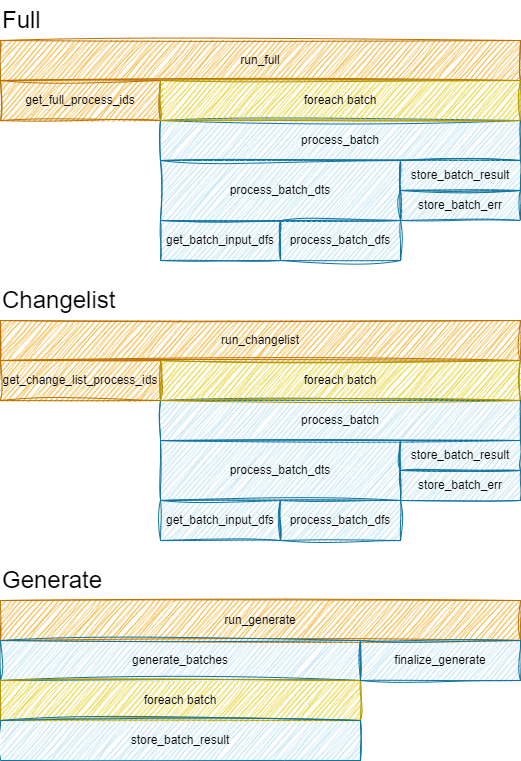
!! Note, lifecycle of generator is different
Change Detection and Merging
Needs review. This page was carried over from the previous documentation and has not been updated yet.
Case: model inference on images
Imagine we have two input tables:
modelsindexed bymodel_idimagesindexed byimage_id
We need to run transform model_infence which result in table
model_inference_for_image indexed by model_id,image_id.
Transform (individual tasks to run) is indexed by model_id,image_id.
Query is built by the following strategy:
- aggregate each input table by the intersection of it's keys and transform keys
- for each input aggregate:
- outer join transform table with input aggregate by intersection of keys
- select rows where update_ts > process_ts
- union all results
- select distinct rows
SQL query to find which tasks should be run looks like:
WITH models__update_ts AS (
    SELECT model_id, update_ts
    FROM models
),
images__update_ts AS (
    SELECT image_id, update_ts
    FROM images
)
SELECT
    COALESCE(i.image_id, t.image_id) image_id,
    COALESCE(i.model_id, t.model_id) model_id
FROM input__update_ts i
OUTER JOIN transform_meta t ON i.image_id = t.image_id AND i.model_id = t.model_id
WHERE i.update_ts > t.process_ts
Meta-Table Schema
Work in progress. This page has not been written yet.
Migration from v0.13 to v0.14
Needs review. This page was carried over from the previous documentation and has not been updated yet.
DatatableTansform can become BatchTransform
Previously, if you had to do whole table transformation, you had to use
DatatableTransform. Now you can substitute it with BatchTransform which has
empty transform_keys.
Before:
# Updates global count of input lines

def count(
    ds: DataStore,
    input_dts: List[DataTable],
    output_dts: List[DataTable],
    kwargs: Dict,
    run_config: Optional[RunConfig] = None,
) -> None:
    assert len(input_dts) == 1
    assert len(output_dts) == 1

    input_dt = input_dts[0]
    output_dt = output_dts[0]

    output_dt.store_chunk(
        pd.DataFrame(
            {"result_id": [0], "count": [len(input_dt.meta_table.get_existing_idx())]}
        )
    )

# ...

DatatableTransform(
    count,
    inputs=["input"],
    outputs=["result"],
)
After:
# Updates global count of input lines

def count(
    input_df: pd.DataFrame,
) -> pd.DataFrame:
    return pd.DataFrame({"result_id": [0], "count": [len(input_df)]})

# ...

BatchTransform(
    count,
    inputs=["input"],
    outputs=["result"],

    # Important, we have to specify empty set in order for transformation to operate on
    # the whole input at once
    transform_keys=[],
)
SQLAlchemy tables can be used directly without duplication in Catalog
Starting v0.14 SQLA table can be provided directly into inputs= or
outputs= parameters without duplicating entry in Catalog.
Note, that in order for datapipe db create-all to work, we should use the same
SQLA for declarative base and in datapipe.
Example:
class Base(DeclarativeBase):
    pass


class Input(Base):
    __tablename__ = "input"

    group_id: Mapped[int] = mapped_column(primary_key=True)
    item_id: Mapped[int] = mapped_column(primary_key=True)


class Output(Base):
    __tablename__ = "output"

    group_id: Mapped[int] = mapped_column(primary_key=True)
    count: Mapped[int]

# ...

pipeline = Pipeline(
    [
        BatchGenerate(
            generate_data,
            outputs=[Input],
        ),
        DatatableBatchTransform(
            count_tbl,
            inputs=[Input],
            outputs=[Output],
        ),
    ]
)

# Note! `sqla_metadata` is used from SQLAlchemy DeclarativeBase
dbconn = DBConn("sqlite+pysqlite3:///db.sqlite", sqla_metadata=Base.metadata)
ds = DataStore(dbconn)

app = DatapipeApp(ds=ds, catalog=Catalog({}), pipeline=pipeline)
Table can be provided directly without Catalog
Similar to usage pattern of SQLA tables, it is also possible to pass
datapipe.compute.Table instance directly without registering in catalog.
from datapipe.compute import Table
from datapipe.store.filedir import PILFile, TableStoreFiledir
from datapipe.step.batch_transform import BatchTransform
from datapipe.step.update_external_table import UpdateExternalTable

input_images_tbl = Table(
    name="input_images",
    store=TableStoreFiledir("input/{id}.jpeg", PILFile("jpg")),
)

preprocessed_images_tbl = Table(
    name="preprocessed_images",
    store=TableStoreFiledir("output/{id}.png", PILFile("png")),
)

# ...

pipeline = Pipeline(
    [
        UpdateExternalTable(output=input_images_tbl),
        BatchTransform(
            batch_preprocess_images,
            inputs=[input_images_tbl],
            outputs=[preprocessed_images_tbl],
            chunk_size=100,
        ),
    ]
)
Migration from v0.14 to v0.15
JoinSpec renamed to InputSpec
JoinSpec has been removed. Replace it with InputSpec everywhere.
Before:
from datapipe.types import JoinSpec, Required

BatchTransform(
    func,
    inputs=[JoinSpec("models", join_type="inner")],
    outputs=["results"],
)
After:
from datapipe.types import InputSpec, Required

BatchTransform(
    func,
    inputs=[Required("models")],   # inner join — use Required
    outputs=["results"],
)
Note: Required (inner join) and the plain-table form (outer join) cover the two join_type values that JoinSpec exposed. InputSpec itself is now the base type used when you need key mapping (see next section).
Key mapping with InputSpec.keys and OutputSpec
When two input tables share the same primary key column name (e.g. both have id), the transform engine previously could not distinguish them. InputSpec.keys solves this by giving each table's primary key a transform-level alias.
from datapipe.types import InputSpec, OutputSpec

BatchTransform(
    enrich_posts,
    transform_keys=["post_id", "author_id"],
    inputs=[
        # Post.id → transform key "post_id"
        # Post.author_id → transform key "author_id"
        InputSpec(Post, keys={"post_id": "id", "author_id": "author_id"}),

        # Author.id → transform key "author_id"
        InputSpec(Author, keys={"author_id": "id"}),
    ],
    outputs=[
        # PostCard.id stores the post id → map transform key "post_id" to column "id"
        OutputSpec(PostCard, keys={"post_id": "id"}),
    ],
)
InputSpec.keys is a dict {"transform_key": "table_pk_column"}. Without it, key names are assumed to match (the previous behaviour is preserved).
OutputSpec.keys maps transform keys to output table primary key columns for the purpose of incremental cleanup. Without it, all transform keys are assumed to match the output table's primary key column names.
Explicit step names via name=
All step types now accept an optional name: str | None parameter. When provided, that string is used as the step name exactly — no hash suffix is appended.
This is the recommended way to make step names stable and predictable, especially when using the CLI to target specific steps:
BatchTransform(
    resize_images,
    inputs=[images_tbl],
    outputs=[thumbnails_tbl],
    name="resize_images",   # datapipe step --name=resize_images run
)

UpdateExternalTable(output=images_tbl, name="sync_images")
Without an explicit name, step names are auto-generated from a hash of the step class, function name, and table names. This hash changes if any of those change, which may break --name filters in scripts.
DatatableTransform and UpdateExternalTable now use hash-based names
In v0.14, these two step types used plain auto-generated names:
DatatableTransform→"my_func"(the function name)UpdateExternalTable→"update_images"(the table name)
In v0.15, they use the same hash-based naming as BatchTransform:
DatatableTransform→"my_func_9a3f1c8d"(function name + hash suffix)UpdateExternalTable→"update_images_4b72e091"(table name + hash suffix)
If you use datapipe step --name=my_func run or similar CLI invocations targeting these steps, those name filters will no longer match. Pin the name explicitly to restore stable names:
DatatableTransform(my_func, inputs=[...], outputs=[...], name="my_func")
UpdateExternalTable(output=images_tbl, name="update_images")
Duplicate step names now raise immediately
build_compute() now raises a ValueError if two steps in the same pipeline produce the same name. Previously this was silently accepted, which could cause one step to shadow another.
If you encounter this error, use the name= parameter on the affected steps to give each a distinct explicit name.
DatatableBatchTransform.inputs now accepts PipelineInput
Required and InputSpec wrappers can now be used in DatatableBatchTransform.inputs, matching the behaviour of BatchTransform. Existing code using plain table names or ORM table references continues to work unchanged.
Python 3.9 no longer supported
v0.15.0 uses T | None union syntax and built-in list[T] / dict[K, V] generics, which require Python 3.10 or later. Upgrade to Python 3.10+.
Internal: DataTable.meta_table → DataTable.meta
If your code directly accessed DataTable.meta_table (a non-public attribute), rename it to DataTable.meta. The attribute now returns a TableMeta interface instead of the concrete SQLTableMeta class.